
Why Appointment Reminder Compliance Costs You More Than You Think
Appointment reminder compliance is the practice of sending patient notifications in a way that meets HIPAA privacy rules, FCC frequency limits, and TCPA consent requirements — all at the same time.
Here is what compliant appointment reminders require at a glance:
| Requirement | Rule |
|---|---|
| Content | Limit to first name, date, time, location, and provider name — no diagnoses, procedures, or specialties |
| Frequency | No more than 3 messages per week, 1 per day |
| SMS length | 160 characters maximum |
| Call duration | 60 seconds maximum |
| Consent | Document patient communication preferences; warn patients before using unsecured channels |
| Vendor contracts | Signed Business Associate Agreement (BAA) required for any third-party handling patient data |
| Opt-out | Every message must include a clear, functional opt-out option |
| Record retention | Consent forms and communication logs must be kept for at least 6 years |
Missed appointments are one of the most costly and preventable problems in healthcare. Non-attendance rates at outpatient clinics run between 15% and 30% worldwide. In the US alone, no-shows cost the healthcare system an estimated $150 billion every year. For a single practice, that can mean $150,000 or more in lost revenue annually — and 33% of patients who miss appointments say they simply forgot.
The fix sounds simple: send a reminder. But here is where many healthcare providers get into trouble.
A reminder that is too long, sent too often, or contains too much clinical detail can violate federal law. HIPAA, the FCC, and the TCPA each impose their own overlapping rules on how, when, and what you can communicate to patients. Getting any one of those layers wrong opens the door to penalties starting at $100 per violation — with annual maximums reaching $1.5 million per violation category.
Most providers are not trying to cut corners. They just do not realize how many rules apply to something as routine as a text message reminder.
This guide walks you through every layer of compliance, from what words you can and cannot include, to how to structure your consent process, to which vendors need a signed agreement before you send a single message.
I’m Kelly Rossi, founder of Marketing Magnitude and a digital marketing strategist with over 20 years of experience building integrated systems for service-based businesses — including healthcare providers navigating the operational and legal demands of appointment reminder compliance. In the sections below, I’ll break down exactly what the regulations require and how to build a reminder workflow that protects your practice while actually improving your show rates.
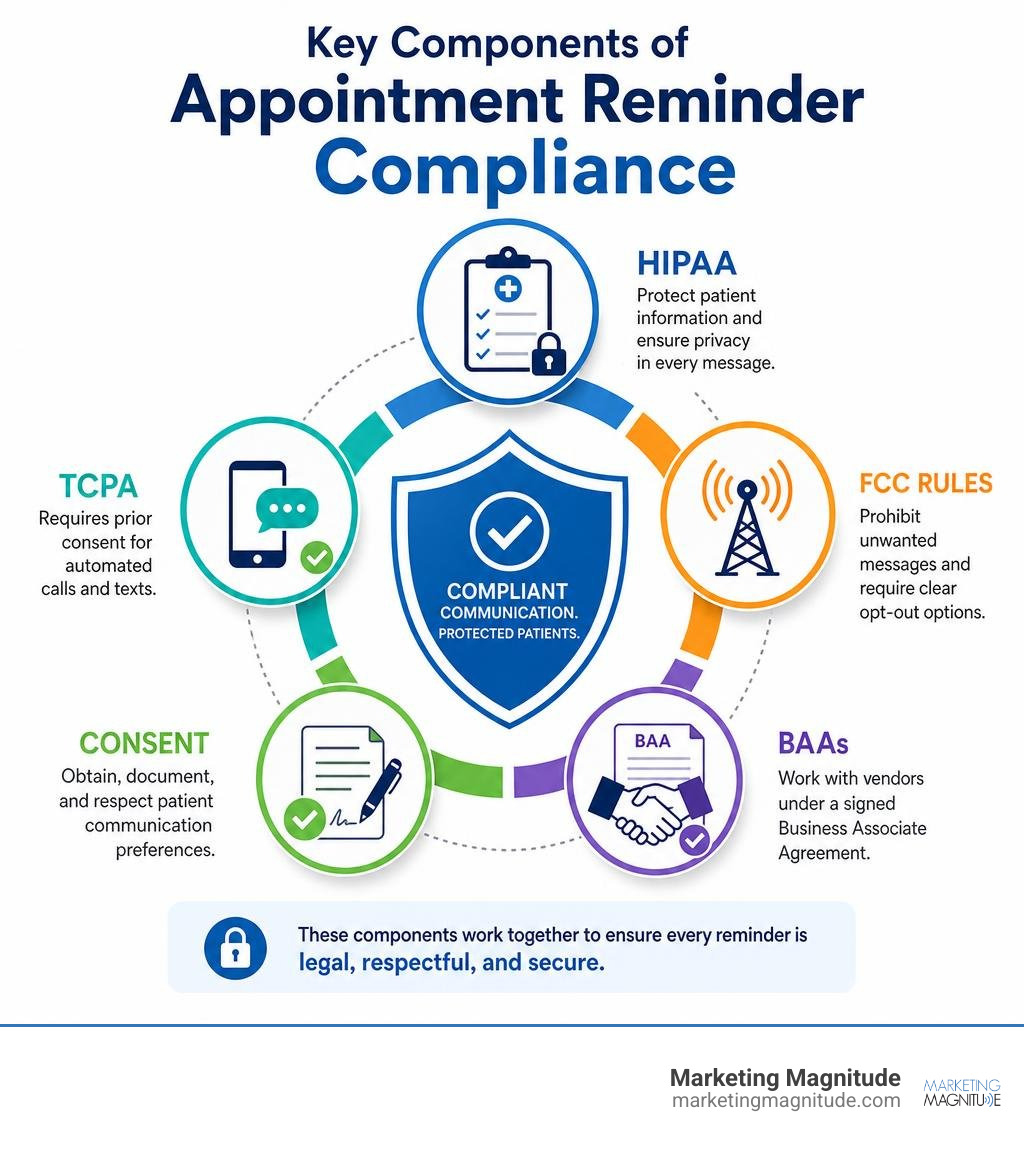
The Regulatory Landscape of Appointment Reminder Compliance
When we design automated communication systems for healthcare practices, we must look at the regulatory landscape as a multi-layered shield. Protecting patient privacy while maintaining operational efficiency requires a deep understanding of how different federal frameworks interact.

Many providers mistakenly believe that if their system is HIPAA-compliant, they are completely safe. In reality, sending automated messages triggers a completely different set of rules enforced by the Federal Communications Commission (FCC). To build a truly secure, high-performing patient outreach workflow, we must align our systems with both the Department of Health and Human Services (HHS) and the FCC.
For a comprehensive overview of how these rules govern modern medical practices, you can review the guidelines on HIPAA Compliant Appointment Reminders. Additionally, when mapping out your automated text and voice campaigns, it is vital to keep federal communication standards in mind; as outlined in Sending Patient Appointment Reminders? Don’t Forget the FCC, telecommunication compliance is just as critical as data privacy.
HIPAA Privacy Rules and the Minimum Necessary Standard
Under the HIPAA Privacy Rule, appointment reminders are legally classified as “treatment communications” under the Treatment, Payment, and Healthcare Operations (TPO) provisions. The HHS officially clarified in 2002 that providers do not need explicit patient authorization to send these reminders, which you can confirm directly through the official HHS portal on Are appointment reminders allowed under the HIPAA Privacy Rule ….
However, this permission comes with a major catch: the Minimum Necessary Standard.
The Minimum Necessary Standard dictates that we must limit the disclosure of Protected Health Information (PHI) to the absolute minimum required to achieve the purpose of the communication. When sending reminders over unencrypted, unsecured channels like standard SMS or standard email, we must ensure that no sensitive clinical data is exposed.
While the Minimum Necessary Standard does not strictly apply to direct, secure disclosures made to the patient, it heavily applies to messages that could be intercepted, seen on a lock screen, or left on a shared household voicemail. For example, if a family member answers the patient’s home phone, or if a text message previews on a lock screen, revealing clinical details is a direct violation.
To remain compliant, we must omit:
- Specific diagnoses or symptoms
- Specific treatment plans or medication names
- Specific procedure names (e.g., “colonoscopy” or “MRI”)
- Highly specific provider specialties that inherently reveal a medical condition (e.g., “Oncologist” or “Psychiatrist”)
Instead, we use generic, safe language like “your appointment” or “your upcoming visit with Dr. Smith.” The patient already knows why they scheduled the appointment; the reminder is simply there to tell them when and where to show up.
FCC and TCPA Rules for Patient Outreach
While HIPAA governs the content of your reminders, the Telephone Consumer Protection Act (TCPA) of 1991 and FCC regulations govern the delivery of those reminders. The TCPA was originally designed to stop aggressive telemarketing, but its rules apply broadly to any business using automated dialers, artificial intelligence, or automated text messaging systems.
Under the FCC’s 2015 declaratory ruling, healthcare providers are granted a specific “healthcare exception” that allows them to send automated voice calls and text messages without prior written consent. However, to qualify for this exception, your system must strictly adhere to the following operational boundaries:
- Strict Frequency Limits: You are limited to sending a maximum of one message per day and three messages per week per patient, per specific medical matter.
- Call Duration Limits: Automated voice reminders or robocalls must be limited to 60 seconds or less.
- Text Character Limits: Automated SMS reminders must be limited to 160 characters or less.
- No-Cost Delivery: The patient must not be charged for receiving the communication (which means your system must be compatible with free-to-end-user carrier standards).
- Non-Promotional Content: The message must be purely transactional and informational. Under no circumstances can it contain marketing, billing collections, or promotional content.
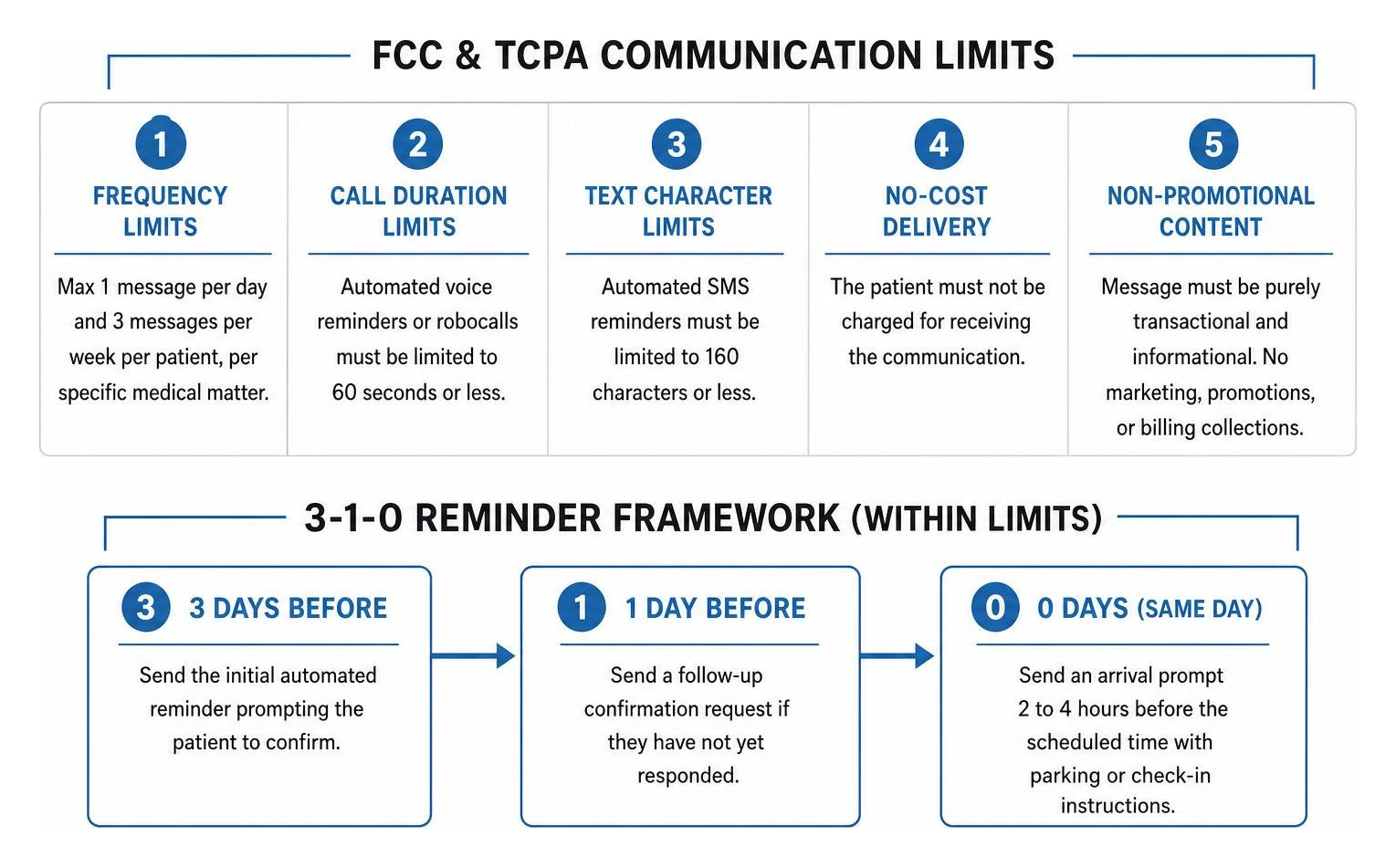
To balance these strict limitations with the clinical need to keep schedules full, we recommend implementing the 3-1-0 framework. This is a highly strategic cadence that respects FCC frequency limits while maximizing patient recall:
- 3 Days Before: Send the initial automated reminder prompting the patient to confirm.
- 1 Day Before: Send a follow-up confirmation request if they have not yet responded.
- 0 Days (Same Day): Send an arrival prompt 2 to 4 hours before the scheduled time with parking or check-in instructions.
Best Practices for Maintaining Appointment Reminder Compliance Across Channels
To ensure consistent compliance, we must eliminate human error from the communication workflow. Relying on front-desk staff to manually type out text messages or emails is a recipe for compliance failures. Instead, we advocate for the implementation of standardized, system-enforced templates.
Standardized templates ensure that every message sent across SMS, email, and voice channels is pre-vetted for compliance. To see how these templates fit into a broader operational strategy, you can read the HIPAA-Compliant Appointment Reminders: Complete 2025 Guide.
A compliant, multi-channel template strategy should look like this:
- SMS Template (Green Light – Fully Compliant): “Hi [First Name], this is a reminder of your upcoming visit with [Provider Name] on [Date] at [Time]. Please reply C to confirm or R to reschedule. Reply STOP to opt out.”
- Email Template (Green Light – Fully Compliant): “Subject: Your upcoming visit at [Practice Name]. Dear [First Name], this is a reminder of your appointment on [Date] at [Time] with [Provider Name] at our [Location Name] clinic. To reschedule, please call us at [Phone Number]. To unsubscribe from email reminders, click here.”
- Voicemail Template (Green Light – Fully Compliant): “This is [Practice Name] calling for [First Name]. We are calling to remind you of your scheduled visit on [Date] at [Time]. Please call us back at [Phone Number] to confirm or reschedule.”
Beyond system automation, ongoing staff training is essential. Team members must be trained to never reply to a patient’s text message with sensitive medical information. If a patient replies to a text asking, “Is this appointment for my biopsy results?” staff must be trained to respond with: “For your privacy, we cannot discuss clinical details over text. Please call our office directly at [Phone Number] so we can assist you.”
Technical and Administrative Safeguards for Secure Reminders
Achieving appointment reminder compliance is not just about writing the right text messages; it requires a robust technical and administrative infrastructure behind the scenes.

Many healthcare practices suffer from hidden operational vulnerabilities that compromise patient data and lead to quiet revenue loss. In our analysis of 7 Hidden Business Leaks No Agency Mentions, we highlight how fragmented communication systems and unsecure data handling can create massive liabilities for growing businesses.
Securing Data with Encryption and Business Associate Agreements
From a technical standpoint, any software platform that handles, processes, or transmits patient communication data must implement industry-standard security protocols. This includes SSL/TLS encryption for all data during transmission and AES-256 encryption for data stored in databases and servers. Workstations and administrative portals must feature automatic session timeouts, unique employee logins, and role-based access controls to prevent unauthorized access to communication logs.
However, technical security is legally meaningless without a signed Business Associate Agreement (BAA).
Under HIPAA, any third-party vendor that creates, receives, maintains, or transmits PHI on your behalf is legally defined as a “Business Associate.” This includes SMS gateways, email delivery platforms, CRM software, and automated scheduling tools. Traditional consumer-grade email and texting platforms (such as standard Gmail or basic SMS tools) do not offer BAAs and cannot be used for patient communications.
For a step-by-step breakdown of how to audit your software stack, you can consult How to Comply with HIPAA When Sending Appointment Reminders.
When evaluating vendors, keep in mind these critical warnings:
- The Offshore Loophole: Many software companies host their operations offshore. While they may sign a BAA, offshore entities are often not subject to US jurisdiction, meaning your practice could carry 100% of the legal and financial liability in the event of a data breach. Always verify that your vendor’s servers are physically located in the United States.
- Conduit Exception vs. Persistent Access: Traditional telecommunication carriers (like AT&T or Verizon) and the US Postal Service fall under the “conduit exception” because they merely transmit data without storing or interacting with it. Modern automated scheduling software, VoIP systems, and marketing automation platforms do not qualify as conduits because they store communication logs, patient contact lists, and scheduling data on their servers. They must sign a BAA.
Managing Patient Consent and Alternative Communication Requests
To protect your practice from devastating TCPA class-action lawsuits, you must build a bulletproof consent management system. Under the TCPA, while certain transactional reminders are exempt from prior written consent, sending automated text messages to mobile phones is highly risky without documented permission.
We advise capturing explicit communication preferences during your patient intake process. This consent must cover:
- The specific channels the patient permits (SMS, email, voice calls)
- Acknowledgment of the inherent security risks of unencrypted channels (like standard SMS or email)
- Clear instructions on how to opt out of future communications
To understand how to structure these consent forms legally, you can review the standards outlined in Consent for Appointment Reminder Calls and Texts | LeadCompliant. Additionally, for a deep dive into the operational execution of these consent protocols, check out HIPAA-Compliant Appointment Reminders: Best Practices.
Furthermore, under the HIPAA Privacy Rule (45 CFR § 164.522(b)), patients have an absolute right to request “confidential communications by alternative means or at alternative locations.” For example, a patient in an abusive relationship may request that reminders only be sent via SMS to a private mobile number rather than a home landline voicemail. Your practice is legally required to accommodate these reasonable requests and document them in your EHR/CRM system in real time.
Optimizing Reminder Systems to Maximize Show Rates and Rescheduling
Once your compliance foundation is secure, we can focus on what we do best: optimizing these systems to drive measurable business growth.
An optimized reminder system does not just prevent no-shows; it turns your scheduling workflow into an active engine for revenue recovery. By implementing intelligent automation, we can help you keep your chairs filled, reduce the administrative burden on your front desk, and create a seamless experience for your patients.
To see how modern practices manage this balance, explore our specialized solutions for Services/Crm Software Marketing Automation.
To understand why a multi-channel approach is so critical, let’s look at how different communication channels perform in terms of reach, speed, and patient preference:
| Metric | SMS Reminders | Email Reminders | Voice Call Reminders |
|---|---|---|---|
| Average Open/Answer Rate | 98% (90% read within 3 minutes) | 20% – 30% | 25% – 40% (86% ignore unknown numbers) |
| Successful Contact Rate | 97% – 99% | Highly variable (spam filters) | 30% – 60% (most go to voicemail) |
| Patient Preference | 64% – 97% of patients prefer SMS | Best for long-form instructions | Preferred by older demographics |
| No-Show Reduction | 20% – 30% reduction | 10% – 15% reduction | 15% – 20% reduction |
| Rescheduling Rate | High (with 2-way interactive SMS) | Low (delayed response times) | 17% – 26% (high but labor-intensive) |
Tailoring Outreach to Diverse Patient Populations
A common mistake is applying a single, rigid communication style to your entire patient database. To maximize show rates, we must segment and tailor our outreach based on patient demographics and behavioral profiles.
For example, mobile phone ownership and text-message adoption decline sharply with increasing age. While your younger patients will actively ignore phone calls and expect SMS, your older patient populations will respond far better to automated or manual voice reminders. Your system must be flexible enough to default to the patient’s preferred channel automatically.
For clinics managing high-risk or highly specialized populations (such as behavioral health, where no-show rates can reach 30% to 40%), we implement the “Reminder Plus” concept.
A standard reminder simply states the date and time. A “Reminder Plus” message adds brief, supportive, or clinical context to reduce patient anxiety or clarify expectations. For example, a psychiatric clinic might include a gentle orientation statement:
“Hi Sarah, this is a reminder of your visit with Dr. Chen tomorrow at 10:30 AM. We look forward to seeing you. Please remember to bring your updated intake form. Reply C to confirm.”
By addressing common barriers to care (like anxiety or confusion about preparation) directly in the reminder, we can significantly increase compliance. To discover how cutting-edge clinics are scaling these personalized, compliant conversations, check out AI Appointment Reminder Systems for Healthcare | Claire.
Addressing Inefficiencies to Achieve Appointment Reminder Compliance
The most common operational leak in patient communication is a lack of integration. If your reminder system operates independently from your Electronic Health Record (EHR) or primary calendar, you create critical blind spots.
For instance, if a patient calls your office to cancel an appointment, but your reminder system does not sync with your calendar in real time, the patient may still receive an automated “same-day check-in” text. This is not only highly unprofessional, but it also violates FCC frequency limits by sending unnecessary, unprompted messages. We advise that your CRM and EHR systems sync every 5 to 15 minutes to prevent these administrative breakdowns.
Furthermore, a compliant reminder system must make it incredibly easy for patients to cancel or reschedule. If a patient must navigate a complex phone tree just to cancel, they will simply hang up and become a no-show.
By integrating automated, low-friction cancellation pathways (such as “Reply R to reschedule”), we can capture cancellations early. This allows your front desk to immediately re-allocate that open time slot to a waitlisted patient, recovering lost revenue before it impacts your bottom line.
Frequently Asked Questions
What information is safe to include in a compliant appointment reminder?
To keep your unencrypted reminders (like SMS and standard email) safe and compliant, you should only include the minimum necessary administrative details.
- Safe to Include: The patient’s first name, the appointment date and time, the physical location of the clinic, the provider’s name (e.g., “Dr. Park”), and generic instructions (e.g., “please arrive 15 minutes early”).
- Prohibited (Unless Encrypted): Specific diagnoses, symptoms, procedure names (e.g., “Botox consultation,” “colonoscopy,” “MRI”), medication names, and sensitive provider specialties that reveal a medical condition (e.g., “Dr. Smith, Oncologist”).
Do I need a Business Associate Agreement (BAA) for my SMS or email vendor?
Yes. If your SMS gateway, email delivery platform, or CRM software has access to any patient identifiers (including names, phone numbers, email addresses, or scheduling dates), they are legally classified as a Business Associate under HIPAA. You must have a signed BAA in place before transmitting any data.
Standard consumer-grade messaging tools do not offer BAAs and cannot be used. Traditional physical mail and landline telephone networks are exempt under the “conduit exception,” but any digital, cloud-based communication software requires a BAA.
How does the FCC limit the frequency and length of appointment reminders?
Under the FCC’s healthcare exception to the TCPA, automated healthcare communications are limited to:
- A maximum of one message per day and three messages per week per patient, per specific matter.
- Automated voice calls must be 60 seconds or less in duration.
- Automated text messages must be 160 characters or less in length.
- Every communication must be completely free to the end-user and must include an immediate, easy-to-use opt-out mechanism (like replying “STOP”).
Conclusion
Achieving appointment reminder compliance is not a barrier to business growth — it is the foundation of it.
At Marketing Magnitude, we believe that sustainable business growth happens when your marketing, communication, and operational systems work together as one connected ecosystem. By automating your patient outreach within a secure, legally compliant framework, you protect your practice from costly regulatory fines while plugging the revenue leaks caused by missed appointments.
We specialize in helping relationship-centered, trust-based businesses build scalable, automated workflows that respect patient privacy while keeping schedules full. If you are ready to transform your patient communication from a fragmented administrative chore into a high-performing, compliant growth engine, explore our advanced systems for Services/Email Marketing Automation.
Let us help you grow smarter, operate more efficiently, and scale sustainably. Reach out to our team today to build a secure, connected communication system for your practice.