What Is Email Automation and How Does It Function?
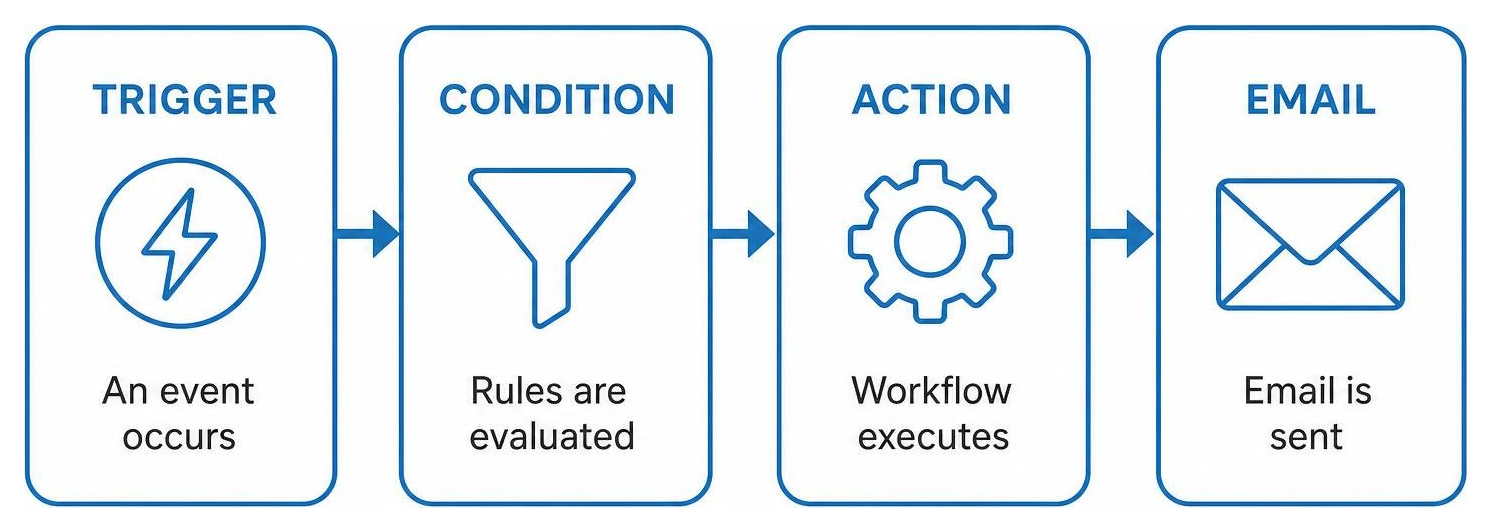
Email automation is the process of sending targeted, time- or behavior-triggered emails to prospects and customers automatically using marketing software. It functions by continuously monitoring specific subscriber actions or data triggers – such as form submissions, link clicks, or scheduled appointments – and applying conditional rules to execute relevant actions without requiring manual intervention.
To understand how automated systems manage communication behind the scenes, think of an automated workflow as a digital relay race. Instead of a team member manually writing an email every time someone interacts with your brand, software continuously monitors incoming data points and responds according to predetermined rules.
When implemented correctly, automated workflows turn complex customer journeys into smooth, predictable touchpoints. Whether you manage patient consultations in Las Vegas or field service appointments in Austin, TX, setting up responsive communication ensures no prospect or client falls through the cracks.
Triggers, Conditions, and Action Logic
The functional architecture of modern automation relies on three core building blocks working in harmony:
- Predefined Triggers: These represent the initial catalyst that starts a sequence. Triggers can include form submissions, specific link clicks, a scheduled consultation date, a page visit to a high-intent service page, or an API call from an external billing platform.
- Conditional Logic (“Check If”): Before any message goes out, the platform checks specific rules. For example, the workflow might evaluate: Has this contact already completed their initial intake consultation? or Is this client located in our primary service territory? If the condition is met, the path splits to provide tailored messaging.
- Action Execution: Once criteria align, the system completes designated tasks. This can include sending a customized email template, scheduling a time delay, applying a behavioral tag, alerting an internal specialist, or triggering a webhook integration to synchronize external systems.
Inbound Email Marketing vs. Cold Email Automation
Businesses often confuse opt-in marketing automation with cold email prospecting systems. While both operate on scheduled logic, they serve fundamentally different functions and require distinct technical infrastructures:
| Feature | Inbound Email Marketing | Cold Email Automation |
|---|---|---|
| Audience Relationship | Explicit opt-in subscribers, active leads, and existing clients | Outbound prospects who have had no prior interaction with the brand |
| Primary Objective | Nurturing trust, onboarding, retention, and lifecycle communication | Initiating direct business development discussions and booking discovery calls |
| Sending Architecture | Shared or dedicated email service provider (ESP) marketing servers | Individual corporate inboxes using dedicated domains and custom mailboxes |
| Deliverability Focus | Subscriber engagement, click tracking, domain reputation, and list hygiene | Technical mailbox warming, SPF/DKIM alignment, and avoiding spam detection filters |
| Content Style | Formatted brand templates, educational articles, dynamic resource links | Plain-text, hyper-personalized one-to-one conversational outreach |
The right architecture depends on your audience relationship, compliance obligations, internal sales process, and long-term communication goals. Inbound lifecycle automation is typically strongest for nurturing known contacts, while outbound systems require stricter technical controls and careful messaging discipline.
Tiers of Email Automation: Simple, Advanced, and Enterprise
Automated workflows scale alongside operational maturity. We categorize these implementations into three practical tiers:
- Simple Email Automation: Basic linear sequences. A customer fills out a web form, receives an instant confirmation, and gets a scheduled follow-up three days later. These single-branch sequences are easy to maintain and ideal for basic inquiry handling.
- Advanced Email Automation: Multi-branch paths guided by behavioral interactions. If a subscriber opens a message and clicks a specific service link, they branch into an educational pathway focused on that topic. If they do not open the message, the platform waits two days and adjusts the subject line. This tier also introduces dynamic content blocks and basic predictive sending.
- Enterprise Orchestration: Comprehensive lifecycle automation across multiple channels and software stacks. Dynamic customer profiles sync with external databases, adjusting communication across email, SMS, and client portals in real time based on lifetime value metrics, predictive buying windows, and custom API events.
Choosing the right tier should reflect your team’s capacity, current technology stack, contact volume, reporting needs, and the complexity of your customer journey.
Key Strategic Benefits of Automated Communication
Implementing an automated communication engine is one of the most effective investments a business can make. Rather than relying on staff memory to follow up with every estimate or inquiry, your technology stack executes consistent outreach automatically.
The strategic advantages include:
- Substantial Lead Generation: Organizations leveraging robust automated systems generate twice as many qualified leads compared to businesses relying on manual follow-up routines.
- Exceptional Return on Investment: Email continues to deliver outstanding ROI, generating between $36 and $42 on average for every $1 invested.
- Increased Campaign Revenue: Targeted, behavior-driven email flows can generate up to 320% more revenue than unsegmented, generic email broadcasts.
- Operational Scalability: Routine communication tasks – such as sending intake paperwork, confirmations, and re-engagement surveys – occur instantly in the background, freeing your internal team to focus on direct client care and service delivery.
- Elevated Client Trust: Research shows that 90% of consumers find personalized content very or somewhat appealing. Automated workflows allow you to deliver hyper-relevant guidance based on exact service history and stated preferences.
Businesses evaluating their technology framework should prioritize systems that connect marketing, CRM data, customer communication, and reporting into one measurable growth infrastructure.
High-Impact Workflow Sequences for Modern Businesses
Building an automated communication engine does not require launching dozens of convoluted funnels simultaneously. Sustainable growth starts with a small group of high-performing sequences designed around critical customer lifecycle moments.
With organizations hiring for specialized talent—as reflected in 50 Email Marketing Specialist Jobs in Austin, Texas Metropolitan Area—it is clear that structured, data-informed communication is essential for sustainable operations.
Welcome and Onboarding Series
The first interaction sets the tone for your client relationship. Because 74% of subscribers expect a welcome email immediately upon signup, this window offers your highest engagement potential. In fact, welcome messages achieve 4 times more reads and 5 times more clicks than standard promotional broadcasts, generating up to 320% more revenue per email.
This onboarding sequence should clearly communicate what working with your business looks like, provide requested materials immediately, and invite the reader to take their next logical step, such as booking an intake call or completing an assessment.
Cart Recovery and Re-engagement Sequences
Whether you offer online product orders, paid course registrations, or online appointment deposits, drop-offs are inevitable. Roughly 70% of e-commerce shoppers abandon their carts prior to checkout.
Automating recovery outreach recaptures high-intent prospects before they look elsewhere:
- Email 1 (Sent within 1 to 2 hours): Helpful check-in. “Did you experience technical issues while scheduling your session?”
- Email 2 (Sent at 24 hours): Address common objections, showcase social proof, and highlight real client reviews.
- Email 3 (Sent at 48 to 72 hours): Introduce a time-sensitive incentive, such as a fee waiver or priority scheduling link, to prompt a final booking decision.
Similarly, win-back flows monitor client accounts that have remained inactive for 60 to 90 days. Sending a helpful check-in allows you to rekindle relationships or cleanly unsubscribe unengaged contacts to protect your delivery reputation.
Multi-Channel Extension and CRM Synchronization
Automated communication gains massive leverage when synchronized with your central customer relationship management software and complementary channels.
For instance, learning How to Set Up a Drip SMS Campaign in 5 Easy Steps allows you to pair timely text messages with longer educational email assets for appointment reminders and urgent alerts.
Specialized sectors require workflows tailored to unique compliance and patient scheduling needs. Reviewing The Ins and Outs of Email Automation Tools for Dentists illustrates how healthcare providers use structured workflows for hygiene recalls, pre-appointment instructions, and post-treatment follow-ups.
Deliverability Protocols and Platform Selection Criteria
Even the most thoughtfully written email workflow fails if your messages land in the junk folder. Maintaining exceptional inbox delivery rates requires strict adherence to modern authentication standards and proper technical hygiene.
Technical Deliverability and Compliance
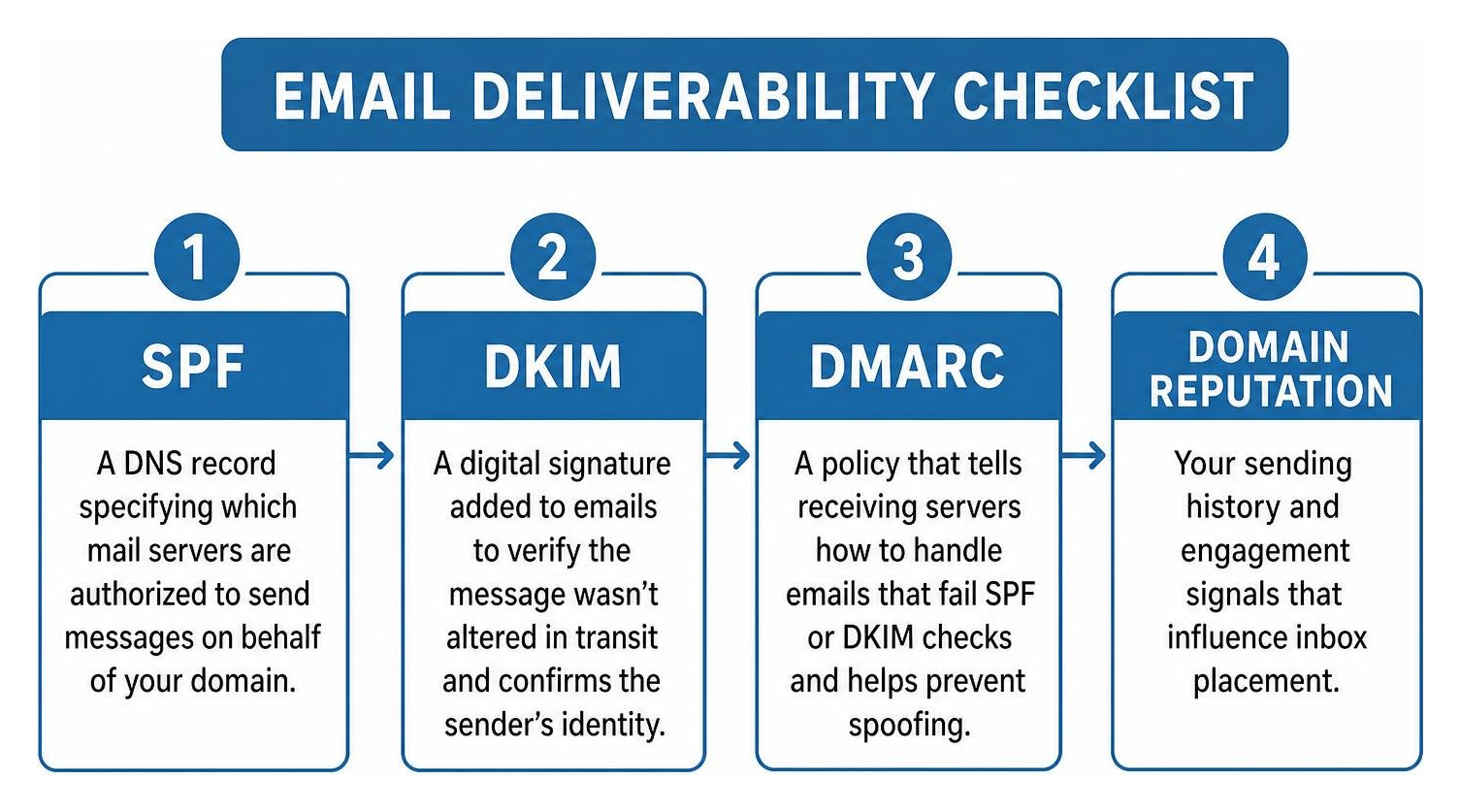
Major mailbox providers require proper technical domain configuration to verify your identity and protect recipients from phishing and spoofing:
- SPF (Sender Policy Framework): A DNS record specifying which mail servers are authorized to send messages on behalf of your domain.
- DKIM (DomainKeys Identified Mail): A cryptographic signature added to email headers that confirms the message was not altered in transit.
- DMARC (Domain-based Message Authentication, Reporting, and Conformance): A governance policy instructing receiving mail servers how to handle emails that fail SPF or DKIM checks.
- Regulatory Compliance: Ensure strict adherence to the CAN-SPAM Act and international privacy frameworks like GDPR. This requires visible physical business addresses, clear identification of your business, and one-click unsubscribe links.
- Template Optimization: Avoid overly heavy HTML formatting, broken code, and spam-trigger phrases. Clean layouts ensure fast loading speeds and prevent automated spam filters from flagging your content.
Strong deliverability depends on both technical configuration and content discipline. Clean templates, accurate segmentation, permission-based lists, and consistent engagement monitoring all help protect sender reputation over time.
Choosing the Right Platform Architecture
Selecting the right software foundation depends on your team’s workflow requirements, contact volume, and operational goals:
- Visual Automation Builders: Look for intuitive canvas builders that let you visualize complex branches, delays, and conditions without writing custom scripts.
- Predictive Personalization: Including personalized recommendations in automated campaigns can increase sales per email open by an average of 150%. Choose platforms that allow dynamic text replacement and custom audience segmentation.
- Transparent Contact Management: Evaluate how platforms bill for inactive or unsubscribed records. Ensure you can easily archive stale contacts to keep your active database clean.
- Connected Infrastructure: Prioritize tools that support reliable payment, scheduling, database, and CRM triggers so your automated workflows can respond to real customer activity.
To maintain unified pipeline visibility, your email system should connect directly with your core Services CRM Software Marketing Automation ecosystem.
Frequently Asked Questions
Can I Integrate My Existing CRM With Automated Sequences?
Yes. Modern CRM systems and email platforms communicate seamlessly via native integrations, API connections, and webhooks. Connecting your CRM enables dynamic lead scoring, automated deal stage updates, and unified customer profile tracking. When a prospect books a consultation in your CRM, the integration immediately halts lead nurturing sequences and triggers onboarding reminders automatically.
What Is the Best Strategy to Prevent Automated Messages From Landing in Spam?
Protecting your deliverability requires a combination of technical setup and audience list management:
- Authenticate your sending domain with SPF, DKIM, and DMARC records.
- Use double opt-in verification forms to ensure all email addresses are valid.
- Remove inactive subscribers who have not opened an email in 90+ days.
- Avoid all-caps subject lines, excessive exclamation marks, and misleading clickbait copy.
- Encourage early engagement by asking new subscribers to reply directly to your welcome email.
How Do Single Trigger Emails Differ From Drip Campaigns?
A single trigger email is a standalone, event-driven response sent immediately after one specific action—such as a password reset link, consultation receipt, or lead magnet download. In contrast, a drip campaign is a pre-scheduled series of multiple interconnected messages distributed over several days or weeks to guide a subscriber through an educational, onboarding, or sales journey.
Conclusion
Sustainable business growth does not come from sending disjointed email blasts whenever you find spare time. It happens when you implement connected systems that automatically nurture relationships, deliver exceptional customer care, and scale your operational capacity.
By connecting your marketing touchpoints, CRM pipelines, and behavioral workflows, you build an asset that generates predictable revenue while freeing your team to do what they do best.
Ready to implement an integrated communication ecosystem tailored to your business? Explore our comprehensive Email Marketing Automation solutions at Marketing Magnitude to start building systems that drive real, measurable growth.
Get Started Now
Fill out this form to start your journey to next-level marketing solutions for your business.