What Is Pinterest Digital Marketing? A Quick-Start Overview
Pinterest digital marketing is the practice of using Pinterest’s visual search platform to drive traffic, build brand awareness, and generate sales — through both organic content and paid ads.
Here’s what you need to know at a glance:
| What | Why It Matters |
|---|---|
| Visual search engine | Users search with buying intent, not just to browse |
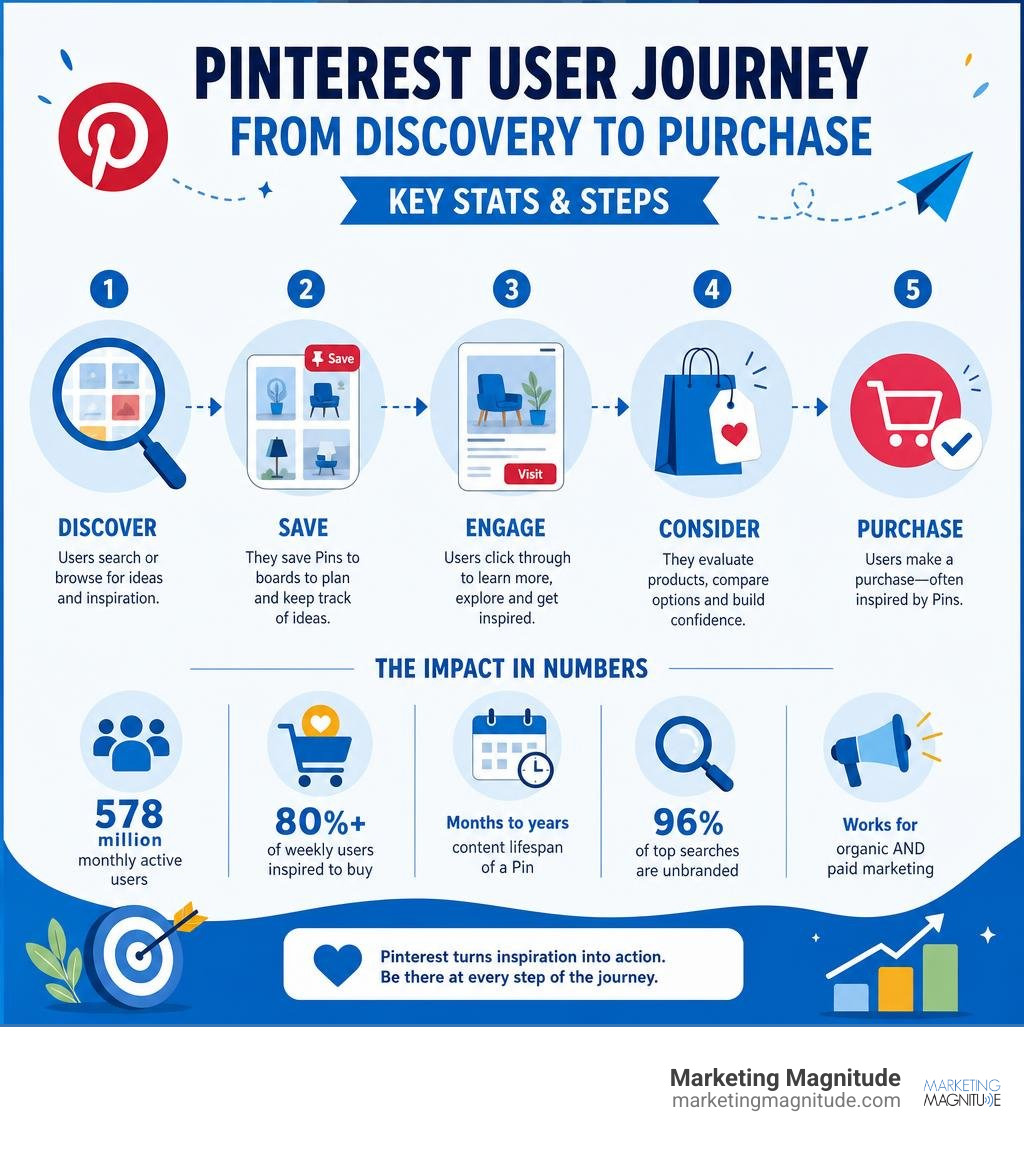
| 578 million monthly active users | Massive, engaged audience ready to discover products |
| 80%+ of weekly users inspired to buy | High purchase intent compared to other platforms |
| Content lifespan of months to years | One pin can drive traffic long after it’s published |
| 96% of top searches are unbranded | Lesser-known brands can compete and win |
| Works for organic AND paid marketing | Flexible strategy for any budget |
Pinterest is not like Instagram or Facebook. It works more like Google. People come to it with a specific goal — to find something, plan something, or buy something. That makes it one of the most powerful (and underused) tools in digital marketing today.
This guide walks you through everything: setting up your account, mastering Pinterest SEO, creating pins that convert, running ads, and measuring real results.
I’m Kelly Rossi, founder of Marketing Magnitude and a digital marketing strategist with over 20 years of experience building campaigns that drive measurable growth — including pinterest digital marketing strategies for businesses across a wide range of industries. In the sections below, I’ll break down exactly what works in 2026, based on real data and hands-on experience.
Why Pinterest Digital Marketing Is Essential in 2026
To succeed in digital marketing today, we have to look past vanity metrics and focus on where consumers actually make buying decisions. In July 2026, the digital landscape is noisier than ever. Traditional social networks suffer from decaying organic reach, where a post’s lifespan is measured in minutes or hours.
Pinterest completely flips this script. Because it acts primarily as a visual search engine rather than a chronological feed, a single Pin can drive consistent traffic to your website for six to twelve months—and in many cases, even years.
Several key factors make a robust pinterest digital marketing strategy essential for modern businesses:
- The Power of Unbranded Searches: An incredible 96% of the top searches on Pinterest are unbranded. This means users are looking for solutions, ideas, and products (e.g., “minimalist home office ideas” or “best clean skincare routine”) rather than searching for a specific brand name. This levels the playing field, allowing smaller and growing brands to capture high-intent traffic before consumers have even decided who to buy from.
- Exceptional Demographic Reach: Pinterest reaches over 40% of U.S. households earning more than $150,000 annually. Furthermore, Gen Z remains the platform’s fastest-growing demographic, now accounting for 42% of its global user base of over 578 million monthly active users. Additionally, the audience is diversifying rapidly, with men making up about 30% of global users.
- High Purchase Intent: Weekly Pinterest users are significantly more likely to say that ads on Pinterest feel highly relevant and helpful compared to other platforms. That is because people use Pinterest to plan their future purchases. When they see an ad, it does not interrupt their experience; it inspires it.
If you are still wondering, does social media marketing really work? the answer is yes—but only when you align your strategy with user intent. Platforms like Pinterest allow us to capture users right at the transition point between discovery and action. For a deeper dive into modern visual strategy, you can explore the Your Pinterest Marketing Strategy Guide for 2026 – Shopify resource.
Setting Up Your Profile for Pinterest Digital Marketing Success
To lay a solid foundation for your campaigns, you must set up your Pinterest presence as a professional business hub. A personal account will not suffice; you need a dedicated Pinterest Business: Marketing on Pinterest account to unlock advanced analytics, rich pin formats, and the Pinterest Ads Manager.
Follow this step-by-step checklist to optimize your profile:
- Create or Convert to a Business Account: If you have an existing personal account with relevant followers, you can easily convert it. Otherwise, create a fresh business account.
- Optimize Your Display Name and Bio: Use your brand name and include 2-3 primary keywords. You have 160 characters for your bio—make sure it clearly explains what value you offer and includes searchable terms.
- Claim Your Website: This is a crucial step. Claiming your website proves to Pinterest’s algorithm that you are a verified creator. It also automatically adds your profile picture and a “Follow” button to any Pin saved from your site, boosting your brand’s distribution.
- Enable Rich Pins: Rich Pins automatically sync metadata directly from your website to your Pins. There are three primary types: Product Pins (which show real-time pricing and stock availability), Article Pins (which pull headlines and author details), and Recipe Pins.
- Install the Pinterest Tag: To run successful paid campaigns and track conversions, you must install the Pinterest Tag (pixel) on your website. This allows you to build custom retargeting audiences and measure exact actions, such as sign-ups or checkouts.
Understanding the TransActV2 Algorithm
Pinterest’s search and recommendation mechanics rely heavily on its proprietary TransActV2 algorithm. Unlike chronological feeds that prioritize how recently a post was published, this algorithm acts as a highly personalized recommendation engine.
The algorithm evaluates content based on:
- Domain Quality: The perceived trust of your verified website.
- Pin Quality: How often your Pins receive engagement, saves, and outbound clicks.
- Visual Relevance: Pinterest’s advanced AI scans the actual image to identify objects, text, and color palettes, matching them with relevant search terms.
- User Search Intent: It prioritizes showing Pins that closely align with the user’s explicit search queries and implicit browsing history.
By designing high-resolution vertical assets and structuring your metadata correctly, you signal to the algorithm that your content is highly relevant, helping you secure long-term organic distribution.
Mastering Pinterest SEO and Keyword Research
Because Pinterest is a search engine, your visibility depends entirely on Pinterest SEO. If you do not optimize your profile, boards, and Pins with the exact phrases your audience is searching for, your content will remain invisible.
Keyword research on Pinterest is straightforward because the platform tell us exactly what users want. Here is how we build a high-performing keyword map:
- Pinterest Autocomplete: Start typing a broad term related to your industry into the Pinterest search bar. The platform will automatically drop down a list of popular, long-tail search terms. For example, typing “digital planner” might reveal “digital planner goodnotes,” “digital planner aesthetic,” or “digital planner financial.” These autocomplete terms are goldmines for organic search optimization.
- Guided Search Bubbles: After pressing enter on a search term, look at the colored keyword tiles that appear directly below the search bar. These represent secondary modifiers that users frequently add to refine their searches.
- Pinterest Trends: Navigate to
trends.pinterest.com. This free tool allows us to monitor rising search volumes, compare different search terms, and identify seasonal spikes.
Once you have compiled a list of 30 to 50 target keywords, you must place them strategically across your profile to generate 3 Tips for Consistent Social Media Traffic.
Optimizing Pin Descriptions and Board Architecture
Your board structure acts as the organizational library of your profile. When Pinterest’s algorithm crawls your account, it looks at how your boards are categorized to understand your niche.

To optimize your boards and Pin descriptions:
- Board Names: Keep them under 30 characters so they do not get truncated on mobile screens. Use clear, keyword-rich titles (e.g., “Healthy Meal Prep Ideas”) rather than clever or vague titles (e.g., “Yummy Stuff”).
- Board Descriptions: Write a natural paragraph of 2-3 sentences incorporating your target keywords. Avoid keyword stuffing; the descriptions should read naturally to human visitors.
- Pin Descriptions: Keep your descriptions between 100 and 300 characters (though the limit is 500). Place your most critical target keyword in the very first sentence. Include a strong, action-oriented call-to-action (CTA) such as “Click to download your free template.”
- Alt Text: Do not forget to fill out the alt text field. This helps visually impaired users understand your Pin and provides additional textual context to Pinterest’s visual recognition AI.
Seasonal Planning and Trend Forecasting
Pinterest users are planners. They start searching for seasonal events, holidays, and trend-based purchases 45 to 90 days before they actually occur. For example, searches for holiday decor begin climbing in September, and summer fashion trends spike in late winter.
To stay ahead, we align our content calendars with the annual Watch Pinterest Presents™ 2025 reports and the official Pinterest Predicts trends. These predictive reports have an astonishing 88% accuracy rate over the last six years because they are built on early search indicators.
We also leverage the annual Pinterest Palette, which forecasts trending colors based on rising search data. By incorporating these specific, trending hues into your visual assets months in advance, you position your brand to ride the wave of high-volume seasonal searches.
Creating High-Performing Pins That Convert
Creating beautiful assets is only half the battle; they must also be structured to convert casual viewers into website traffic and leads. Pinterest is a highly visual medium, and your designs must stand out in a crowded, infinite feed.
To ensure your Pins perform at their peak, keep these core design principles in mind:
- Vertical Aspect Ratio: Always design your Pins in a 2:3 aspect ratio (ideally 1000 x 1500 pixels). Square or horizontal images will perform poorly and are likely to be ignored or truncated by the feed.
- High-Contrast Text Overlays: Most users browse Pinterest on mobile devices. Use large, bold, easily readable text overlays (at least 16pt font) that communicate the exact value of your Pin. Avoid hard-to-read script fonts.
- Brand Integration: Place your logo naturally on the Pin—ideally at the top or bottom center. Avoid placing it in the bottom-right corner, as Pinterest’s native visual search icons can cover it up.
- Soft, Warm Color Palettes: Tailwind’s benchmark studies reveal that only 4% of viral Pins strictly use a brand’s corporate color scheme. Instead, the most viral Pins utilize soft, light, or high-contrast background colors (with white, off-white, and light grey dominant in 87 of the top 100 viral hex codes).
If you struggle to keep up with asset creation, we recommend checking out 4 Steps to Quickly Fill Your Social Media Content Calendar. For more advanced insights on creative layouts, read the Pinterest Marketing: The Complete 2025 Guide – Tailwind Blog guide.
Advanced Creative Formats for Pinterest Digital Marketing
As the platform has evolved, Pinterest has introduced several interactive ad formats that allow brands to tell richer stories and shorten the path to purchase.

- Video Pins: Video is incredibly powerful for capturing attention. Keep your videos short (6 to 15 seconds) and design them to be watched with the “sound off” by including clear captions or text overlays.
- Carousel Pins: These allow users to swipe through up to five images. Carousels are perfect for step-by-step tutorials, before-and-after transformations, or showcasing a product collection.
- Collection Pins: These feature a large hero image or video supported by three smaller product thumbnails below it. When clicked, they open a full-screen catalog of shoppable items.
- AR Try On: This augmented reality feature allows users to virtually “try on” beauty products or preview home decor items in their space, reducing purchase hesitation and driving higher conversion rates.
The Fresh Pin Strategy vs. Saves
In the past, marketers grew their accounts by repeatedly saving (“repinning”) the same images to multiple boards. Today, the algorithm heavily favors Fresh Pins.
A “Fresh Pin” is defined as a brand-new image or video that Pinterest has never seen before. To maintain algorithmic favorability without constantly writing new articles or launching new products, we use the Fresh Pin Strategy. This involves designing 5 to 10 distinct visual variations (using different layouts, colors, and headlines) that all link to the exact same high-converting landing page. This keeps your queue full of fresh content while maximizing the traffic potential of your existing web assets.
Organic Strategy vs. Paid Pinterest Ads
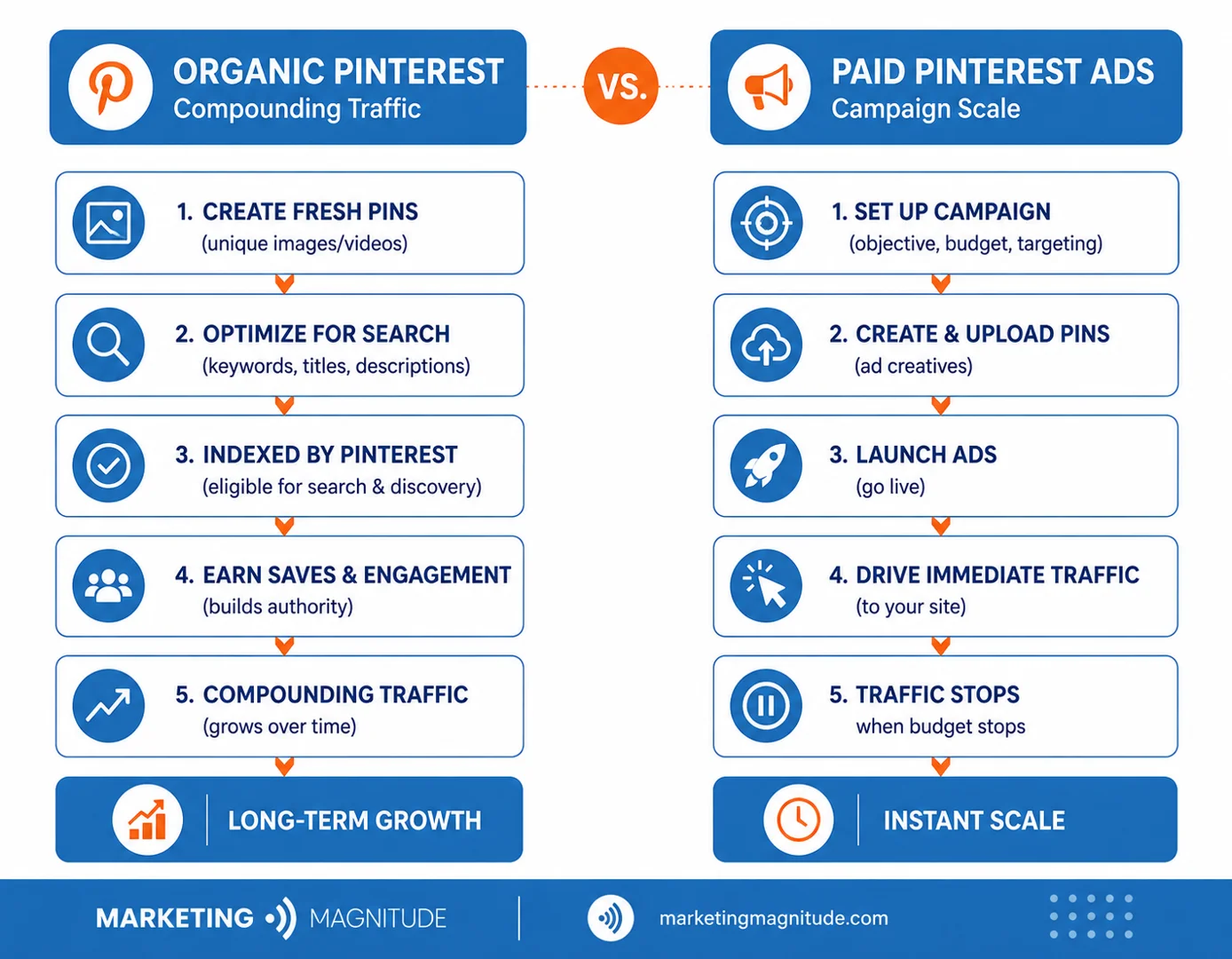
A balanced pinterest digital marketing strategy utilizes both organic and paid tactics. Organic Pins build long-term, compounding search authority, while paid Pinterest Ads allow you to scale your reach instantly and target specific buyer personas.
| Feature | Organic Pinterest | Paid Pinterest Ads |
|---|---|---|
| Primary Value | Long-term compounding traffic, high credibility | Instant traffic, precise targeting, scale |
| Lifespan | 6 to 12+ months | Active as long as your budget runs |
| Targeting | Based on search engine indexing and SEO | Keywords, interests, demographics, retargeting |
| Optimization | Manual SEO and consistent pinning | Performance+ AI-driven budget and bidding |
| Conversion Tracking | Standard web analytics (UTMs) | Pinterest Tag + Conversions API |
When running paid campaigns, we highly recommend integrating the Pinterest Conversions API alongside your on-site Pinterest Tag. Brands utilizing the Conversions API see an average 9% improvement in cost per action (CPA) due to refined attribution data and better machine-learning optimization. If you are comparing paid channels, read our breakdown of Social Media Ads vs Google Ads.
For professional management of your paid campaigns, our team at Marketing Magnitude can help you design, track, and optimize your Pinterest advertising to ensure your budget drives measurable business growth.
Leveraging Pinterest for Digital Products and Lead Generation
If you sell digital products—such as eBooks, templates, planners, or online courses—Pinterest is an absolute goldmine. Because users are actively looking for solutions to their problems, you can capture high-intent leads by offering valuable free resources.
Instead of trying to sell a paid product directly from a Pin (which can be a difficult conversion), use Pinterest as the top-of-funnel engine for your lead generation.
- Design a High-Value Lead Magnet: Create a free checklist, a mini-template, or a quick guide that solves a specific problem.
- Link to a Dedicated Landing Page: Ensure your Pin links directly to a clean, distraction-free landing page where users can exchange their email address for the freebie.
- Nurture via Email Automation: Once they join your email list, use automated email sequences to build trust, deliver value, and introduce your premium, paid digital products.
This automated funnel approach turns search-intent traffic into a predictable stream of passive income. For a deeper look at this strategy, read the comprehensive Pinterest Marketing for Digital Products: A Complete Strategy – DEV Community guide.
Verified Merchant Program and Shopping API
For e-commerce brands, joining the Verified Merchant Program (VMP) is a must. This free program awards your profile a blue checkmark, signaling trust to potential buyers.
More importantly, the VMP connects your store directly to Pinterest via the Shopping API. This integration automatically syncs your product catalog, ensuring that your Product Pins display real-time pricing, stock availability, and accurate descriptions. It also unlocks advanced product tagging, allowing you to tag up to 24 specific products directly on your lifestyle Pins.
Measuring Performance and Avoiding Common Pitfalls
To ensure your efforts are translating into actual business growth, you must look past basic vanity metrics (like monthly viewers) and focus on data that impacts your bottom line.
Using Pinterest Analytics, we track three primary key performance indicators (KPIs):
- Saves (Repins): This indicates high content value and future intent. When a user saves your Pin, they are telling you they plan to return to it later.
- Outbound Clicks: This measures how many users actually clicked through your Pin to visit your website, landing page, or store. This is the ultimate metric for measuring traffic generation.
- Conversions: Tracked via the Pinterest Tag, this shows how many users completed a desired action (like a purchase or email sign-up) after engaging with your Pins.
Always use custom UTM parameters on all of your Pin links. This ensures that you can accurately track your Pinterest traffic, leads, and conversion paths in Google Analytics or your CRM dashboard. For more tips on avoiding general social media marketing traps, review the 5 Major Social Media Marketing Mistakes to Avoid guide.
Integrating Pinterest with Your Multi-Channel Marketing Ecosystem
At Marketing Magnitude, we believe that true business growth does not happen in a silo. Your marketing channels should function as a unified, connected ecosystem.
When you integrate Pinterest with your broader digital marketing strategy, you create a powerful compounding effect:
- CRM and Lead Nurturing: When a user discovers your lead magnet on Pinterest and signs up, our CRM and automation platforms immediately trigger personalized follow-up sequences. This ensures no lead falls through the cracks and converts search traffic into long-term customer relationships.
- Email Marketing Synergy: Use your regular email newsletters to promote your top-performing Pinterest boards, or embed shoppable Pins directly in your emails to drive cross-platform engagement.
- Cross-Promotion: Repurpose your top-performing short-form video content from Instagram Reels or TikTok into Pinterest Video Pins. This maximizes your creative investment and introduces your brand to an entirely new, search-minded audience.
Common Pinterest Marketing Mistakes to Avoid
To keep your account in good standing with the algorithm and maximize your ROI, avoid these common pitfalls:
- Keyword Stuffing: Do not write descriptions that are just lists of keywords. Make sure your copy reads naturally and provides genuine context.
- Inconsistent Pinning: Dumping 50 Pins in one day and then ignoring your account for a month will hurt your visibility. It is much better to pin 3 to 5 Fresh Pins daily to signal consistent activity to the algorithm.
- Ignoring Mobile Optimization: Over 80% of Pinners use the mobile app. Always test your Pin designs on a mobile screen to ensure your text overlays are highly readable.
- Deleting Underperforming Boards: Deleting boards can hurt your account’s historical authority. If a board is no longer relevant, archive it instead of deleting it.
Frequently Asked Questions about Pinterest Marketing
How long does it take to see results from Pinterest marketing?
Because Pinterest is a search engine, your Pins must be indexed before they start ranking in search results. Expect to invest 3 to 6 months of consistent pinning and SEO optimization before seeing significant, steady traffic. However, unlike social networks where traffic peaks instantly and dies, Pinterest traffic compounds over time, driving clicks for months or years.
Do I need a business account to run Pinterest ads?
Yes. To run paid campaigns, access the Pinterest Ads Manager, view advanced analytics, or verify your website, you must have a free Pinterest Business account. You can easily convert an existing personal account or create a brand-new business profile.
What is the optimal Pin size for mobile devices?
The optimal size is 1000 x 1500 pixels (a 2:3 vertical aspect ratio). This vertical format occupies the maximum amount of screen real estate in the mobile feed, preventing your images from being truncated or ignored by users.
Conclusion
Pinterest digital marketing is one of the most powerful ways to build a compounding, long-term stream of high-intent traffic, leads, and sales. By treating the platform as a visual search engine, optimizing for Pinterest SEO, and designing high-quality vertical assets, you can reach an active, shopping-minded audience ready to discover your brand.
At Marketing Magnitude, we specialize in building integrated growth systems that connect your marketing, CRM, automation, and operations into one unified, high-performing engine. We help service-based businesses scale sustainably, turn search traffic into loyal clients, and eliminate fragmented marketing systems.
Ready to unlock the compounding power of visual search for your brand? Explore our Social Media Management services or reach out to us today to build your custom growth infrastructure.
Get Started Now
Fill out this form to start your journey to next-level marketing solutions for your business.